reading binary data using swift

I have a file containing sensor information from the IoT device and need convert the values to tablular table.

In C/C++ or Python(?), it is easy. In Swift, it is quite complext, and here is how to do it.

There are two ways to do that. 1) using withUnsafeBytes, 2) using an extension with withUnsafeBytes

Here are the example

Không có tiêu đề

Check this link to have a better explaination, i copied the 2nd method fromt the auther https://appventure.me/posts/2016-07-15-swift3-nsdata-data.html

Bias and variane

Given the true model is

Y=f(X) + e

so expected squared error at a point x is

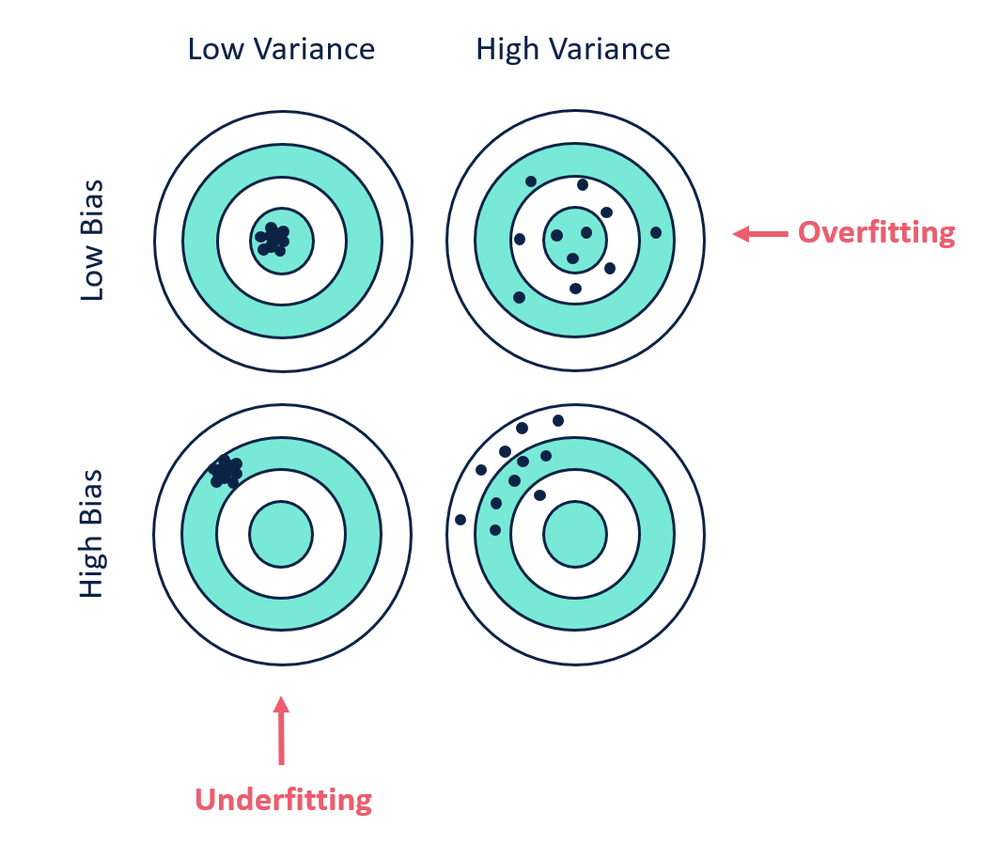
Bias shows how different between the average prediction and the true value

Variance show the everage between the prediction values and average of prediction value


High bias means underfitting. The intuition is that it learns a wrong set

High variance means overfitting. The intuition behide this is that it learns every sample by heart and lack of generalization

biasVVariance.png


Adventure with flutter

I have never done any mobile programming before. It’s mainly because of complexitiy of Android Studio and Xcode, their workflows are no ’natural’. The tools also not ’natural’.

That’s why when I see Flutter, I give it a try. So far, the experience is positive and very interesting.

The plugin tricks you to get all the web browsing history

Trade your web history for a useful function

Summary: the plugin will block websites for you. In return, all of your web history, present, future and past, is sent to their server. List of installed apps on mobile phone as well as all internet connection of your mobile are sent to their server. Use it or not is your choice.

Screen Shot 2018-11-08 at 9.24.43 PM

Recently, I searched for a Firefox plugin to block certain websites. I divert me from the distraction. Usually, i would block them by writing down directly into the host file. However, with a simple extension it would be more convinient.

After search on the plugin list, I found this blocksite (https://blocksite.co). They have application Android also but no iOS app yet (you can guess why after reading this). I works perfectly as expected. It even redirect the blocked sites to a nice internal html page. That’s nice. I was totally happy with it.

However, like all the cat, I am curious with their privacy policies and I was bored too. That’s when I discover the bitter truth.

It is here for your reviewing: https://blocksite.co/privacy/

Summary:

  1. What information collected:

    “Browsing history information, including URLs/domains visited, HTTP referrer, URL of service redirects and client redirects, and URL name of the link clicked on”; ==> your past visited websites, your present and your future also

  2. For the mobile app:

    1. All web connections from the installed apps on the device; ==> They will collect all the internet connections of any applications installed on your mobile, such as internet connection from your twitter, facebook app, etc ==> I do not know how to check it on Android device yet. Please verify if possible.

    2. List of installed apps on your devices ==> why do they need this for the block sites function?

    3. Your location ==> for advertising in-app, maybe, I cannot check

  3. Here is their another paragraph

    1. “In practice, in order to provide the Block Site Product, we need to scan the webpages you browse, and we need to retrieve the apps you are trying to open. Meaning, we use the data collected from you, as detailed and specified above, and transmit it to our servers for the purpose of enabling the Block Site Product and in order to know when and where there is content, a website or an app to block” ==> No, you block the websites so the max information you need is the webistes to be blocked. Why do users have to transfer all visited websites to your server?

  4. “We do not share any Personal Information collected from you with third parties or any of our partners.” ==> Should I trust them now?

notes on building zeal on mac

    1. check out the stable branch, because it is using .pro file and can be open by Qt Creator
    2. Follow the instruction Configure  here http://stratus3d.com/blog/2016/12/09/building-zealdocs-for-osx/
cat << EOF >> src/libs/core/core.pri
macx: {
    INCLUDEPATH += /usr/local/Cellar/libarchive/3.2.2/include
    LIBS += -L/usr/local/Cellar/libarchive/3.2.2/lib -larchive
    INCLUDEPATH += /usr/local/Cellar/sqlite/3.15.2/include
    LIBS += -L/usr/local/Cellar/sqlite/3.15.2/lib -lsqlite3

}
EOF
# change according to your computer
  1. Following the instruction here https://stackoverflow.com/questions/35509731/dyld-symbol-not-found-cg-jpeg-resync-to-restart
  2. Now macdeployqt Zeal.app. It is done.

Install R-Studio Server for Mac

It is not support by default. However, below is a quick guide how to to that.

Prequsites:

  • install homebrew
  • hombrew install boost openssl

  • install jdk, downloaded from oracle site, I use jdk 1.8.
  1. get the source code of rstudio. rstudio and rstudio-server are inside the same source code repository Rstudio GitHub
  2. Open INSTALL to see further instructions, enter the source code directory (~/Downloads/tmp/rstudio):
    1. open install-common, and comment the line 23 (./install-boost) because it is installed by homebrew
    2. run dependencies/common/install-common to install pre-quisite requirements, it will need your sudo power to copy the pam  file.
    3. mkdir build

    4. cd build

    5. cmake .. -DRSTUDIO_TARGET=Server -DCMAKE_BUILD_TYPE=Release -DCMAKE_INSTALL_PREFIX:PATH=~/rstudio-server # change the directory to your expectation, here I simply put it in my home folder ~/rstudio-server

    6. make -j9 install # run make in 9 threads

    7. ./rserver –www-address 127.0.0.1 –www-port 8080 –auth-minimum-user-id=500 # enter ~/rstudio-server/bin, and run it, the default port is 8787, here i change the port to 8080

      that is it!

  3. Take a sip of water

Some notes from machine-learning-projects of coursera

  1. do best each steps of machine learning systems
    1. train
    2. dev/test
    3. real world
  2. if the real-world failed, check again all previous steps
  3. Always create a SINGLE NUMBER metric to quickly choose which machine learning algorithm is best.
  4. If the current metrics (i.e., precision, recall) cannot capture the aforementioned number, create a new number, or create a new optimization matrics + new satisfaction, for example, there are Presion, Recall, and Running time. The optimization matrix is [Precision, Recall] subject to the satisfaction that the running time is below number T. All the algorithms which have running time longer than T is discard completely, without reconsider.
  5. Always look at the purpose of machine learning tasks and aim for it. Changes things to make that one works, do not use the metric which is nice to see but cannot capture the goals correctly.